Operating Systems : All Page 7 / 7
Error -2147217865 – The Microsoft Jet database engine cannot find the input table or query ‘xxx’
When running AYS, a message similar to the following randomly appears:
Error: -2147217865 – The Microsoft Jet database engine cannot find the input table or query ‘xxx‘. Make sure it exists and that its name is spelled correctly.
There are too many records to support rollback protection
When manually importing data from any import module into a Microsoft Access database, the following message appears:
There are too many records to support rollback protection.
Please disable rollback protection and try importing again.
Cause
When manually importing records into an AYS database, clicking the Test button imports all of the data but keeps track of all changes made so that those changes can be undone or rolled back at the end of the test. Warnings or errors that are logged during this test may be used to clean up the data set being imported before any live data in the target database is affected. Clicking the Import button still keeps track of all changes made so that if there is a critical error during the import then any changes can still be undone or rolled back.
When importing data into Microsoft Access databases, there is a limit as to how much data can be recorded in the list of changes. The above error indicates that the limit has been reached and a decision must be made to either undo the changes now, or continue without the ability to undo any changes.
Resolution
Option 1: If you are satisfied that the import data set is good then within the import module select the Options tab, and check the box next to Disable Rollback Protection. Once this option is checked then the Test button will no longer be available. Click the Import button to proceed with the import.
Option 2: If you are not satisfied that the import data set is good then break the data set into smaller chunks and test importing each chunk of data individually. Once you are satisfied that the import data set is good then you may either import each chunk of data individually, or import the entire data set. Follow the steps in Option 1 above to disable rollback protection before importing.
Does AYS support multiple business locations or divisions?
Yes, AYS supports multiple physical business locations or multiple logical business divisions for multi-user licenses.
What happened to the Repair Micro edition?
The Repair Micro edition was discontinued in August 2012 with the release of AYS version 3.4. At that time, all Repair Micro edition licenses were automatically updated to Repair Lite edition licenses at no charge.
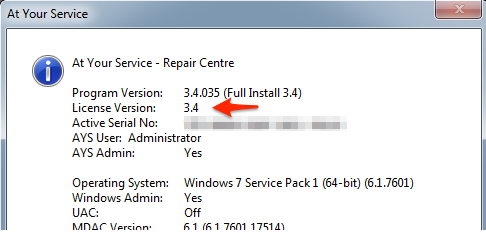
How do I check my current license version?
You can check your current license version by selecting Help > About At Your Service from the main menu and looking at the number next to the label License Version.
How do I use a barcode reader with AYS?
Characters that are scanned by a barcode reader are entered into the active entry field just as if they were typed from a keyboard. Therefore, anywhere that text can be typed with a keyboard, the same characters can optionally be scanned using a barcode reader.
Does AYS work with barcode readers?
Yes. AYS works with most standard barcode readers.
MySQL System Requirements
Here are the requirements for setting up an At Your Service installation to connect to MySQL Server.