AYS system requirements
The minimum requirements for installing and using At Your Service – Repair Center are:
- Windows 10 or higher or Windows Server 2016 or higher
- 2 GB RAM or more
- 300 MB disk space or more
- 1024 x 768 resolution display or higher
The minimum requirements for installing and using At Your Service – Repair Center are:
If you have recently upgraded your Windows operating to a newer version and see a message similar to the one below, what does it mean?
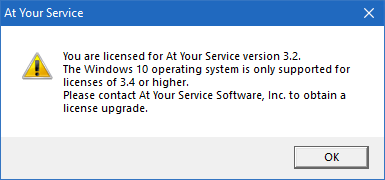
At Your Service – Repair Center is supported on newer 32-bit and 64-bit versions of Windows including:
At Your Service has been tested on the Amazon AWS Lightsail platform. This allows you to run the At Your Service – Repair Center software and database server fully in the cloud, with only minimal client hardware.
The following are basic steps to set up an AWS Lightsail server and get started:
The following are a few steps you should take to get started with a new AYS Repair Center installation.
The following Topaz signature pads are compatible with AYS 2.5 and higher:
Yes. Our programmers can customize existing exports or create completely new custom exports.
At Your Service provides some automatic means for database backup, and you can choose typical backup strategies to improve the security of your data.
This article will describe the configuration and setup of QuickBooks integration with At Your Service Repair Center software.
QuickBooks integration is an optional feature that you may purchase for your license. Please contact us for a quote if you are interested in adding this feature to your license.
Bulk or batch entry of new repair orders is made easy with the batch repair order entry process of AYS Repair Center. Once the initial order is entered, subsequent orders can be entered with minimal additional information.