How do I install AYS on a standalone workstation?
If you would like to install At Your Service – Repair Centre on a workstation that does not have the software installed, follow these steps:
If you would like to install At Your Service – Repair Centre on a workstation that does not have the software installed, follow these steps:
The following is a reference for installing, upgrading, and uninstalling At Your Service – Repair Centre software, as well as related software packages and services and related hardware accessories.
The minimum requirements for installing and using At Your Service – Repair Center are:
At Your Service – Repair Centre works with the following MySQL versions:
At Your Service – Repair Center works with the following Microsoft SQL Server and SQL Server Express versions:
At Your Service – Repair Center is a traditional desktop application, but you can run it remotely on certain cloud services.
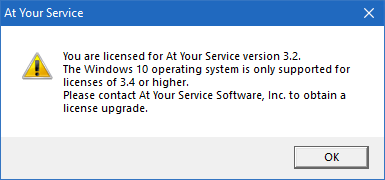
If you have recently upgraded your Windows operating to a newer version and see a message similar to the one below, what does it mean?
At Your Service – Repair Center is supported on newer 32-bit and 64-bit versions of Windows including:
At Your Service has been tested on the Amazon AWS Lightsail platform. This allows you to run the At Your Service – Repair Center software and database server fully in the cloud, with only minimal client hardware.
The following are basic steps to set up an AWS Lightsail server and get started:
The following are a few steps you should take to get started with a new AYS Repair Center installation.